
Relays
Any service running on your machine gets a private HTTPS URL instantly.
What relays are
A relay is a secure HTTPS URL that points to any TCP service running inside your SenetLab machine. You run a React dev server on port 3000, add a relay, and instantly get https://relay.relay-some-unique-id.senetlab.com. No DNS configuration, no TLS certificate, no reverse-proxy setup, no ngrok token in your terminal.
Relays are private by default. The URL contains an unguessable path segment. Only people you share the link with can access it. You can revoke a relay at any time, and the URL stops working immediately.
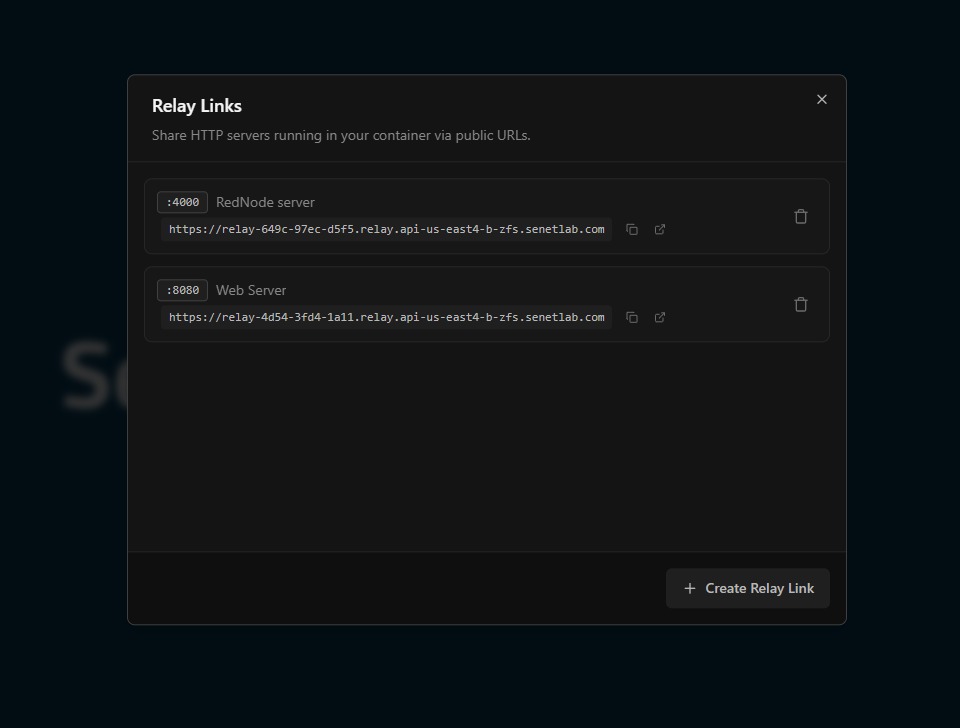
Adding a relay
- Open the machine settings and select the Relays tab.
- Click Add Relay.
- Enter the internal port number — for example,
3000for a Vite dev server or8080for a Spring Boot API. - Click Create. The HTTPS URL appears in the table within seconds.
How relays work
Relays are a transparent HTTP proxy. When you create a relay for port 3000, the SenetLab relay infrastructure opens a connection to 0.0.0.0:3000 inside your machine and forwards every incoming HTTPS request to that port. Your service receives plain HTTP — the relay handles TLS termination at the edge. There is no agent, no daemon, and no persistent tunnel running inside your machine.
The relay sits between the public internet and your process. A request flows like this:
Relay security
Each relay URL contains a random path segment. It is not enumerable by scanning. You can revoke a relay at any time; the URL becomes a 404 immediately. There is no persistent state on the relay servers — they do not log request bodies or store session data.
For additional control, you can restrict relay access to specific IP ranges or require authentication at the application layer. The relay itself handles TLS 1.3 termination and forwards clean HTTP to your process, so your dev server does not need its own certificate.
Common use cases
- Frontend previews — Run
npm run devand share the relay URL with a designer for instant feedback. No deployment, no staging server. - API collaboration — Your backend runs on port 8080 inside the machine. A mobile developer hits the relay URL from their phone to test integration.
- Webhook development — Build a Stripe or GitHub webhook handler locally. Point the provider at your relay URL and watch the requests arrive in real time.
- IoT dashboards — A Flask or Streamlit app visualises sensor data from hardware devices. The relay makes it accessible to stakeholders without VPNs.
Limitations
- Services must accept connections from 0.0.0.0. By default, many dev servers bind to
localhostonly, which means they refuse connections from outside the machine. For example, React's dev server needs--host 0.0.0.0(or-H 0.0.0.0) so the relay can reach it. - Services must accept HTTP connections. The relay forwards HTTP, not HTTPS, to your service. If you are running nginx or another reverse proxy inside the machine, it needs to accept plain HTTP connections from the relay on the configured port.
Relays are designed for development and demonstration traffic, not production load. There are bandwidth and connection limits per relay. If you need to expose a high-traffic service, consider deploying to a dedicated server or using SenetLab's outbound internet access from the machine directly.